School Bell Management Software — India

Every Bell. Every Campus.
One App.

Smart School 360 Software runs every bell, announcement and emergency alert across all your campuses from one screen, and keeps them working even when the internet is down.

See every role live with your team in 30 minutes. Works in your browser — no download needed.
Download the software brochure (PDF) ↓
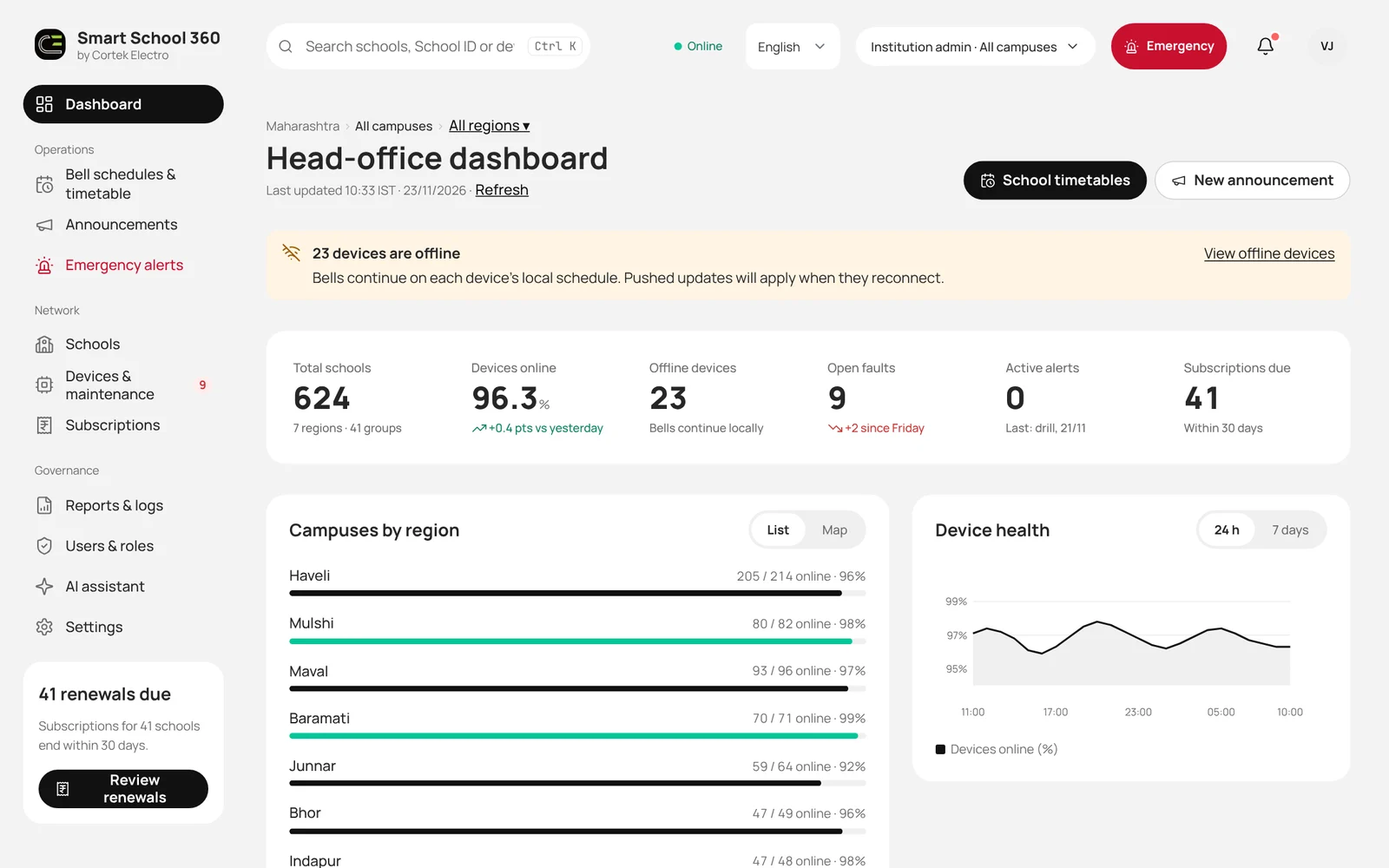
Smart School 360 head-office dashboard showing every campus online
What is Smart School 360 Software?

A Web App That Manages
Your Bell Controllers

Smart School 360 Software is a web app by Cortek Electro, Pune, for managing automatic school bells, announcements and emergency sirens across one or many campuses. It opens in any browser on a phone, tablet or computer, so there is nothing to install, and it is built mobile-first for principals and teachers. It works with the Smart School 360 bell controller installed at each campus: the software manages the device, and the device rings the bells, plays the audio and keeps running on battery and stored timetables when the internet is down. It supports मराठी, हिन्दी and English throughout.

3
Timetables per campus — Regular, Exam, Vacation
5
User roles, each seeing only their campuses
3
Languages — मराठी, हिन्दी, English
0
Installs — it runs in your browser
Bell Timetables

A Timetable for
Every Kind of Day

  • A different timetable for each day of the week, for example a half day on Saturday
  • Three timetables per campus: A0 Regular, A1 Exam and A2 Vacation / Special
  • Add, edit, delete and copy days, for example copy Monday to Mon–Fri
  • Each bell is a time plus a sound or voice clip
  • Two bells at the same time are caught before upload
  • Timetables are stored on the bell device, so bells ring even offline
Bell timetable editor with a different schedule for each day
Holiday Planner

Plan Holidays in Advance.
No Bells on Holidays.

Plan single days or whole date ranges ahead of time. On a planned holiday the bells stay silent, so nobody has to remember to switch the system off.

Holiday calendar with planned holidays and no-bell days
AI Tools

Photograph Your Timetable.
AI Builds the Bells.

  • AI timetable from a photo: photograph the printed timetable, and AI reads every time and creates the bells
  • AI voice-overs: suggests a short spoken line in मराठी, हिन्दी or English after each bell, for example “पहिला तास संपला”
  • Nothing is saved until a person approves it
AI reading a timetable photo and suggesting bells and voice-overs
Announcements

Speak to One Campus
or All of Them

  • Type text and have it spoken (text-to-speech), record your voice, or upload an MP3
  • Plays on every speaker across the campus
  • Play manually: prayers, the national anthem, short or long bell, and custom clips, each with a confirmation step
  • Schedule announcements, or send one to one campus, a group of campuses or all campuses
Announcement composer and one-tap Play manually buttons
Emergency Siren

Sound the Siren in Seconds.
Never by Accident.

  • Two-step trigger: choose the reason, hold the button, then 5 seconds to cancel, so there are no accidental alarms
  • Plays on all speakers and overrides bells until someone stops it
  • Reaches one campus, a group or the whole institution
  • Lower levels acknowledge; the sender or a higher level closes it
  • A teacher's login shows only the siren button
Teacher's phone showing the emergency siren button
Dashboards & Monitoring

See Every Campus, Live

Head office sees the whole institution at a glance. Each principal sees their own campus. Faults and offline devices show up straight away, with maintenance tickets to track the fix.

Head-office dashboard

Every campus live, with devices online or offline and faults.

Campus dashboard

Next bell, today's timetable, device health and speaker zones.

Active systems

Every installed controller with its status and maintenance tickets.

Active systems list with device status and maintenance tickets
On Your Phone

Built for the Phone
You Already Have

Smart School 360 Software is built mobile-first. Principals can check the next bell, today's timetable, device health and speaker zones from their phone, and teachers get a simple screen with just the siren button.

  • Opens in any browser on a phone, tablet or computer
  • Works on slow connections
  • Accessible, with large touch targets and high contrast
  • मराठी, हिन्दी and English throughout
Principal's campus dashboard on a mobile phone
Logs & Reports

A Record of Every Bell,
Every Change

  • A log for every device: each bell, announcement, siren, power cut, clock sync and timetable change
  • Audit trail of who did what, and when
  • Export as CSV or PDF
Device log of bells, announcements and alerts
Access & Security

The Right Access
for Every Person

Five roles, and each person sees only their own campuses. Sign-in is secure and every action is logged.

01
Institution admin
02
Region / group head
03
Principal
04
Teacher
05
Cortek support
Who It's For

From One School
to Hundreds of Campuses

Best for
Large and multi-campus institutions

School groups, education trusts, colleges and universities, where head office wants control and visibility across many campuses.

Also suits
Single campuses

Single schools, colleges, residential schools and coaching centres that run on a fixed bell schedule.

Works with the Smart School 360 controller. The software manages the Smart School 360 bell controller installed at each campus. The device rings the bells, plays the audio and keeps running on battery and stored timetables when the internet is down. The software doesn't run bells on its own without the controller.

Get a Quote

One Software Plan
per Campus

Every plan includes
  • Users for every role
  • Cloud timetables and holidays
  • Announcements and siren alerts
  • Device logs and reports
  • AI timetable import and voice-overs
  • All new features
  • Cortek support and remote fixes
  • Secure cloud backup
Get a quote

Based on the number of campuses.

Get a Quote Download brochure (PDF) ↓
FAQ

Smart School 360 Software
Questions Answered

No. Smart School 360 Software is a web app. It opens in any browser on a phone, tablet or computer, so there is nothing to download or install.
Yes. Timetables are stored on the Smart School 360 bell controller at each campus, so the device keeps ringing bells on its stored timetable and battery backup when the internet or power is down.
No. The software manages the Smart School 360 bell controller installed at each campus. The controller rings the bells and plays the audio; the software is how you plan, control and monitor it.
Yes. Photograph the printed timetable and AI reads every time and creates the bells. It can also suggest a short voice-over in मराठी, हिन्दी or English after each bell. Nothing is saved until a person approves it.
The siren uses a two-step trigger: choose the reason, hold the button, and then there are 5 seconds to cancel. Once it sounds, it plays on all speakers and overrides bells until someone stops it.
Prices depend on the number of campuses. Every plan includes users for every role, AI tools, logs and reports, all new features, Cortek support and secure cloud backup. Call 98349 75938 or contact us for a quote.

Run Every Bell Across
Every Campus From One App

Book a free demo and pilot it on a few campuses.

Book a Demo Download Brochure Chat on WhatsApp

+91 98349 75938 · sales@smartschool360.co.in